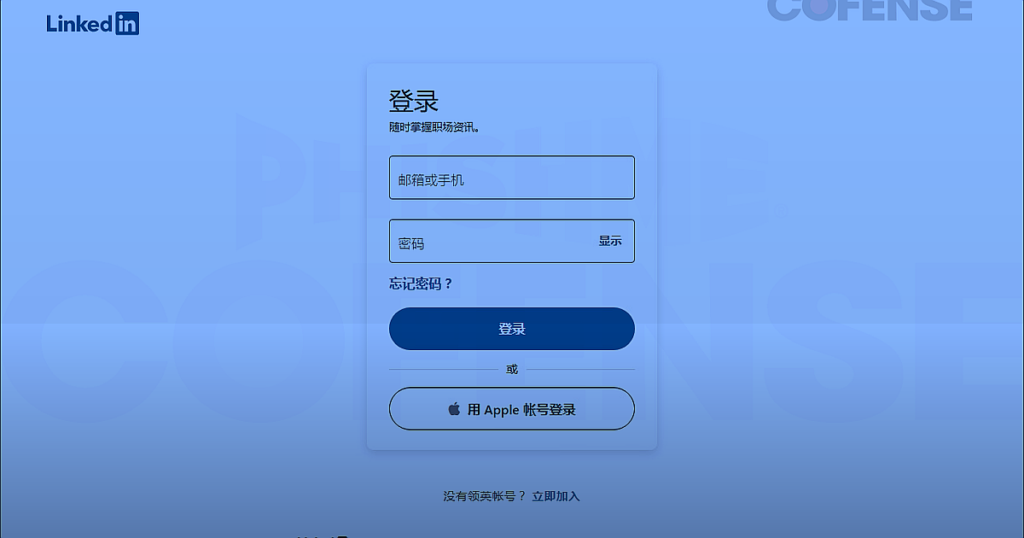
A phishing campaign is using spoofed LinkedIn message notifications to redirect professionals to a pixel-perfect fake login page, where their credentials are harvested the moment they type them in. The Cofense Phishing Defense Center identified the campaign, which exploits the one thing every LinkedIn user does without thinking: clicking on a message notification.
The attack is simple and effective. Targets receive an email that looks identical to a standard LinkedIn message alert, complete with branding, layout, and a notification about a new job opportunity or connection request. The email contains buttons like “View Message” that redirect to inedin.]digital, a domain [registered only two months ago and not affiliated with LinkedIn in any way. The name was chosen deliberately. “inedin” contains the same letter patterns as “LinkedIn,” close enough to pass a quick glance from someone checking notifications between meetings.
The landing page is a near-exact replica of LinkedIn’s login screen. Same layout. Same colors. Same input fields. Once a user enters their email and password, the credentials go directly to the attackers. Cofense’s Senior Director of the Phishing Defense Center described the campaign as a “troubling evolution in social engineering tactics, where attackers embed themselves directly into trusted digital spaces.”
This is part of a pattern that keeps expanding. Over the past two months, Laterstack has covered stolen source code turned into active exploits, security scanners weaponized against the people who use them, and supply chain attacks targeting developer tools. The throughline is the same. Attackers are not breaking through walls anymore. They are walking through doors that look exactly like the ones you use every day. The tools and platforms professionals trust, LinkedIn notifications, GitHub Actions, security scanners, are becoming the attack surface itself.
LinkedIn is a particularly effective target because the behavior it exploits is automatic. Professionals check message notifications without scrutinizing the sender domain. The emails arrive mixed in with real LinkedIn traffic, making them harder to flag. And unlike phishing emails that impersonate a bank or shipping company, LinkedIn notifications carry professional stakes. A job opportunity or connection request creates urgency that bypasses the half-second of skepticism that might save someone from clicking.
What This Means for Everyday People
If you use LinkedIn, treat every email notification with suspicion until you verify it. Do not click “View Message” from an email. Open LinkedIn directly in your browser or app and check your messages there. Look at the sender domain before clicking anything. The real LinkedIn sends notifications from @linkedin.com, not from look-alike domains ending in .digital, .online, or .info. Enable two-factor authentication on your LinkedIn account. It will not stop you from entering your password on a fake page, but it adds a layer that makes stolen credentials harder to use.
The broader problem is that professional networks have become one of the most productive attack surfaces in cybersecurity. The more you trust the platform, the less you question the notification. That is exactly what the attackers are counting on.
Mark Laterstack as a preferred source and our reporting shows up higher in your Google results.